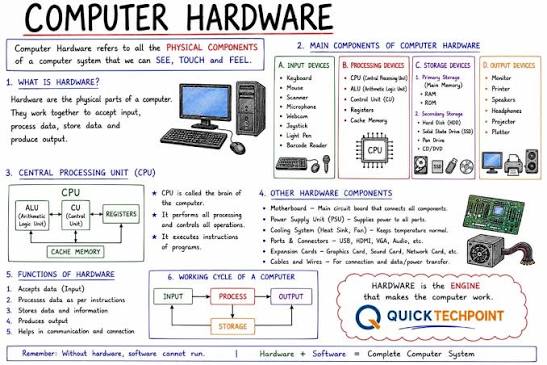

Information Technology Hardware is a key part of modern technology. It includes the physical devices that help people store, process, send, and receive information. Computers, servers, routers, keyboards, and storage drives are common examples.
People use hardware at home, at work, and in schools. Businesses also depend on it every day. Without hardware, software and digital services cannot work properly.
Technology continues to improve. As a result, hardware is becoming faster, smaller, and more powerful. Understanding basic hardware can help users make better technology choices.
What Is Information Technology Hardware?
Information technology hardware means the physical parts of a computer or IT system. You can touch and see these parts.
For example, a desktop computer is hardware. A laptop is also hardware. A server is another type of hardware.
Hardware works with software. Software provides instructions to the device. Hardware then performs those instructions.
Both parts are important. Without hardware, software has no physical system to run on.
Why Is IT Hardware Important?
IT hardware supports many daily tasks. People use computers to work, study, communicate, and create content.
Businesses use hardware to run their systems. They may also use it to store important data.
For example, a company may use servers to host websites. It may use network devices to connect employees.
Therefore, good hardware can help a business work smoothly.
Main Types of IT Hardware
There are many types of information technology hardware.
Common types include:
- Computers
- Servers
- Storage devices
- Network devices
- Input devices
- Output devices
- Peripherals
- Mobile devices
Each type has a different purpose.
Together, these devices create a complete IT system.
Desktop Computers
Desktop computers are common IT devices. They usually include a monitor, computer case, keyboard, and mouse.
Desktop systems can provide strong performance. They are often used in offices, schools, and homes.
Users can also upgrade many desktop parts. For example, they may add more memory or storage.
Therefore, desktops can be useful for long-term use.
Laptop Computers
Laptops are portable computers. Users can carry them from one place to another.
A laptop includes a screen, keyboard, battery, processor, memory, and storage.
Students often use laptops for school work. Businesses also use them for office tasks.
Because laptops are portable, they are useful for remote work.
Servers
Servers are powerful computers that provide services to other devices.
A server can store files. It can also host websites and applications.
Businesses may use servers to manage company data. They can also use them to control network services.
Large companies may operate many servers at once.
Servers need proper maintenance. They also need strong security and reliable backups.
Computer Processors
The processor is an important part of a computer.
It handles instructions and performs calculations. A faster processor can improve performance in many tasks.
Processors are also called CPUs.
Modern CPUs can contain multiple cores. These cores allow the processor to handle different tasks.
However, CPU speed is not the only factor that affects performance.
Memory, storage, software, and cooling also matter.
Computer Memory
Computer memory is often called RAM.
RAM helps a computer handle active tasks. When you open a program, the system uses memory to work with it.
More RAM can help when running several programs at the same time.
However, RAM is different from storage.
RAM temporarily holds active information. Storage keeps files for longer periods.
Hardware
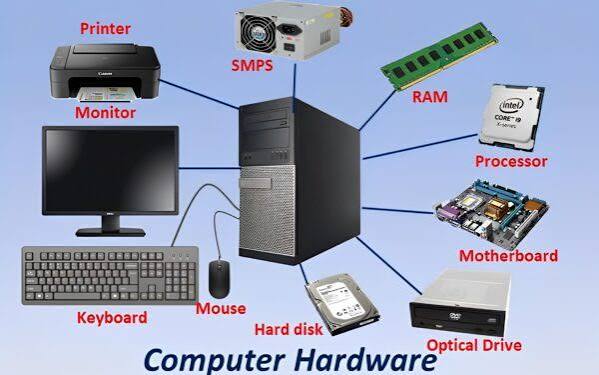
Storage devices keep digital information.
Hard disk drives and solid-state drives are common examples.
An HDD uses spinning disks to store data. An SSD uses flash memory.
SSDs are usually faster than traditional HDDs.
People use storage devices to keep documents, photos, videos, applications, and other files.
Solid-State Drives
Solid-state drives have become popular because they provide fast performance.
An SSD has no moving parts. This can make it faster and quieter than a traditional hard drive.
Many modern laptops use SSD storage.
SSDs can also improve system startup times. They can make applications load faster.
However, users should still maintain backups of important files.
Hard Disk Drives
Hard disk drives have been used for many years.
They store data on spinning magnetic disks.
HDDs can offer large storage capacity at a lower cost. For this reason, businesses may still use them for certain storage needs.
However, they are generally slower than SSDs.
The right storage device depends on speed, capacity, and budget.
Network Hardware
Network hardware connects computers and devices.
Routers, switches, and access points are common examples.
A router can connect a local network to the internet. A switch can connect several devices within a network.
Wireless access points provide Wi-Fi connections.
Together, these devices help people communicate and share resources.
Routers
A router manages traffic between networks.
At home, a router often connects devices to the internet.
Businesses may use more advanced routers. These systems can support many users and provide additional security features.
A reliable router can improve network performance.
However, users should keep router software updated and protect the device with a strong password.
Network Switches
A network switch connects devices within a local network.
For example, an office may connect computers, printers, and servers to a switch.
The switch helps devices communicate with each other.
Businesses often use multiple switches in larger networks.
Switches are important parts of wired IT systems.
Wireless Access Points
Wireless access points provide Wi-Fi connections.
They allow devices such as laptops and smartphones to connect without cables.
Businesses may use several access points to cover large areas.
Good placement can improve wireless coverage.
Security is also important. A protected Wi-Fi network can reduce unauthorized access.
Input Devices
Input devices allow users to send information to a computer.
A keyboard is a common input device. A mouse is another example.
Other input devices include scanners, microphones, cameras, and touchscreens.
These devices make computer interaction possible.
Different users may need different input devices based on their work.
Output Devices
Output devices show or produce information from a computer.
Monitors are common output devices. Printers and speakers are also examples.
A monitor displays text, images, and videos.
A printer creates physical copies of digital documents.
Speakers produce audio from a computer or other device.
Computer Monitors
Monitors are important for desktop systems.
They display information from the computer.
Modern monitors come in different sizes and resolutions.
Some monitors also offer high refresh rates. These can be useful for gaming and video work.
Businesses may choose larger screens for tasks that require more workspace.
Printers
Printers convert digital documents into physical copies.
Businesses use printers for reports, forms, invoices, and other documents.
Different printers use different printing methods.
Inkjet printers are common for home use. Laser printers are popular in many offices.
The best printer depends on printing volume and cost.
Scanners
Scanners convert physical documents into digital files.
A business can scan contracts, forms, and receipts.
This can reduce the need for physical storage.
Scanned documents can also be shared more easily.
However, businesses should protect digital files with proper access controls.
Mobile IT Hardware
Mobile devices are also part of modern IT hardware.
Smartphones and tablets provide many computer functions.
Users can access websites, send messages, run apps, and manage files.
Businesses may provide mobile devices to employees.
Mobile hardware can support remote work and communication.
Hardware for Remote Work
Remote workers need reliable hardware.
A laptop is often the main device. A headset can improve online meetings.
A webcam can also help with video calls.
A stable internet connection is important as well.
Businesses should provide secure devices and proper access tools for remote employees.
Hardware and Software
Hard.ware and software work together.
Hardware is physical. Software is digital.
For example, a laptop is hardware. A web browser is software.
The hardware runs the software. The software tells the hardware what to do.
Both need to work properly for a good user experience.
Hardware Maintenance
IT hardware needs regular care.
Dust can affect computer cooling. Poor ventilation can also cause problems.
Users should keep devices clean and place them in suitable locations.
Businesses should also check cables and connections.
Regular maintenance can help extend hardware life.
Hardware Upgrades
Technology changes quickly.
Older hardware may become slow over time.
Users can sometimes upgrade parts instead of replacing the entire device.
Adding RAM can improve multitasking. Replacing an HDD with an SSD can improve storage speed.
However, not every device supports upgrades.
Users should check compatibility before buying new parts.
Hardware Security
Hardware security is an important part of IT.
Businesses should control who can access physical devices.
Servers should stay in secure areas. Important computers should also use passwords and access controls.
Companies should protect laptops used outside the office.
Physical security can reduce the risk of theft and data loss.
Hardware and Cybersecurity
Cybersecurity does not only involve software.
Hardware can also affect security.
For example, routers and network devices need secure settings.
Computers should receive regular security updates.
Businesses should also replace hardware that no longer receives important updates.
Good security combines hardware, software, and safe user behavior.
Hardware in Data Centers
Data centers contain large amounts of IT hardware.
They may include servers, storage systems, network devices, and power equipment.
Data centers need reliable cooling systems. They also need backup power.
Businesses use data centers to host websites, applications, and digital services.
Large data centers can support thousands of users.
Hardware and Cloud Computing
Cloud services still depend on physical hardware.
Cloud companies operate large data centers. These facilities contain servers and storage systems.
Users may not see this hardware, but it supports many online services.
For example, cloud storage depends on physical storage devices.
Therefore, cloud computing and hardware are closely connected.
Hardware for Gaming
Gaming computers often use powerful hardware.
A gaming system may include a strong processor and graphics card.
It may also need fast storage and enough memory.
A high-quality monitor can improve the gaming experience.
However, users should choose hardware based on the games they play.
Graphics Processing Units
A graphics processing unit is called a GPU.
GPUs process graphics and visual information.
They are important for gaming and video editing.
GPUs are also used for some AI and data tasks.
A powerful GPU can improve performance in applications that need heavy graphics processing.
Hardware for Artificial Intelligence
AI systems can require powerful computing hardware.
GPUs are often used for large AI workloads.
Servers with high-performance processors can also support AI applications.
Storage and network hardware are important too.
The required hardware depends on the size and type of AI project.
Hardware and Business Productivity
Good hardware can improve employee productivity.
Slow computers can waste time. Poor network equipment can also cause delays.
Reliable devices can help employees complete tasks more efficiently.
Businesses should therefore consider performance when buying IT equipment.
At the same time, they should balance performance with cost.
Choosing the Right IT Hardware
Choosing hardware starts with understanding the user’s needs.
First, identify the main tasks. Next, check the required performance.
Consider memory, storage, processor speed, and network needs.
Also think about future growth.
For businesses, security and support are important factors.
A good hardware choice should meet current needs without creating unnecessary costs.
Buying New Hardware
Before buying a device, compare several options.
Check the specifications carefully. Also review warranty and support options.
Businesses should consider the total cost of ownership.
A cheap device may cost more over time if it needs frequent repairs.
Therefore, price should not be the only factor.
Recycling Old Hardware
Old technology should not always go directly into the trash.
Electronic devices can contain materials that require proper handling.
Businesses and individuals should look for approved recycling programs.
Before recycling a computer, remove sensitive data.
Secure data deletion is important when disposing of storage devices.
Future of Information Technology Hardware
IT hardware will continue to improve.
Processors are becoming more powerful. Storage devices are becoming faster.
AI is also creating new hardware needs.
Cloud computing will continue to require large data centers.
At the same time, energy efficiency will become more important.
Manufacturers are working to create devices that provide strong performance with lower power use.
Why IT Hardware Matters
Information technology hardware supports the digital world.
Computers allow people to work. Servers provide online services.
Network devices connect users. Storage systems protect important information.
Together, these devices create the foundation for modern digital services.
Without reliable hardware, many online tools would not function properly.
Final Thoughts
Information Technology Hardware includes the physical devices that support modern computing. These devices include computers, servers, storage systems, routers, switches, monitors, and many other tools.
Hardware works together with software to provide useful digital services. Therefore, both parts are important.
Businesses should choose hardware based on performance, security, cost, and future needs. Users should also maintain their devices and protect important data.
Technology will continue to improve. As a result, IT hardware will become faster, smarter, and more efficient. Understanding the basics can help users and businesses make better technology decisions.